Plugins#
Plugins connect Brain and its Workers to services you use: Linear, Notion, GitHub, Slack, Google Workspace, Cloudflare, Onlora for generating and finding assets, fal and Image generation for media, and custom MCP or OpenAPI services. Plugins are a preview.
Connected accounts belong to the current server. Switching servers in the app shows that server's accounts and never moves an account between servers.
Connect a service#
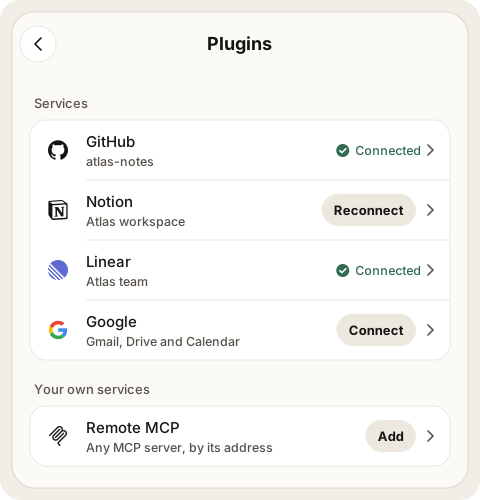
- Open the menu and choose Extensions. Mewla's plugins come first, one row per service.
- Tap Connect on the service's row.
- Sign in on the service's own page and approve Mewla.
- You land back on Extensions with the service Connected. Brain can read and search it right away.
The card at the top of Extensions follows the sign-in: Waiting for Linear while you are on the service's page (with Open Linear again and Cancel), then the result. After a connect it offers Allow changes too; you can skip it and allow changes later on the service's page.
From the web UI, the service returns your browser tab to the web UI's own Extensions page. From the phone app it returns to the app.
If a sign-in comes back without connecting, the card names the step that
failed: the service didn't complete sign-in, didn't accept it, its tools
couldn't be loaded, or this server couldn't save the account. The daemon log
has a matching plugins: line with the cause, never a credential. Connect again
after fixing the cause.
For GitHub, Mewla shows a device code in large type; tap Copy code and open
GitHub and enter it on GitHub's page. You can also choose Use the GitHub
login on this server, which imports the account the GitHub CLI (gh) is
signed in to on your computer. Mewla shows the identity first and copies it only
after you confirm.
There are no tokens, client IDs or callback URLs to type for sign-in services. The two media plugins take an API key instead; see Media.
Sign-in availability#
First-time sign-in is not yet available for every service, because some need Mewla's own app registration with the provider:
| Service | Sign-in | From the web UI |
|---|---|---|
| Linear | Official browser sign-in | Returns to the web UI's Extensions page |
| Notion | Official browser sign-in | Returns to the web UI's Extensions page |
| Onlora | Onlora's sign-in, by email link; a new Onlora account needs an invite code | Works when the web UI is on an https:// address or on this computer (http://127.0.0.1), and returns to its Extensions page |
| Cloudflare | Cloudflare's official MCP server (mcp.cloudflare.com). Its page asks which permissions to grant, Read only unless you choose more. Cloudflare doesn't accept the phone app's return address yet: connect it from the web UI |
Works when the web UI is on an https:// address or on this computer (http://127.0.0.1), and returns to its Extensions page |
| Remote MCP | The server's own sign-in, or a token | Returns to the web UI's Extensions page |
| GitHub | Device code, or import from gh |
Code page opens in a new tab; Extensions updates when you're done |
| Slack | Shows Not yet available until Mewla's Slack app registration ships | Slack's app returns only to the Mewla app: connect Slack from the phone |
| Google Workspace | Shows Not yet available unless your daemon already has Google sign-in configured | Google opens in a new tab; Extensions updates when you're done |
| fal | API key, pasted on its page | Same as the app |
| Image generation | Base URL, API key and default model, on its page | Same as the app |
A service that cannot be connected yet shows Not yet available with a short reason. Accounts you already connected keep working.
What Brain can do#
Tap a service's row to open its page. Every connected account is listed there, each with its status and two switches:
- Read and search: on after sign-in.
- Make changes when asked: off until you turn it on. If the service only granted read access, the switch is an Allow button instead: the service asks you once more, then the switch is on.
Watch reads GitHub and Linear through these same switches: it uses only read tools you allow, and its reads don't show up as recent calls.
Tools & activity lets you allow or block single tools, inspect a tool's schema, run a status check and see recent calls. Every switch takes effect on the tap, with no confirm. The tools are one list: All tools leads it with a switch over every tool, and each group (Read and search, Make changes, and Other tools that Mewla hasn't reviewed) starts with a row holding its own switch, in the same column as the tools' switches. A partly allowed list reads off, with its count beside it: a tap allows the rest, and once all are on a tap turns them all off. When the service still has to approve changes, All tools leaves them off and reads on once everything else is allowed; turning on Make changes asks the service first.
A service can add or change its tools at any time. Mewla picks up the new list
on the next call (or when an MCP server announces it), and tools that did not
change keep working. A new tool, or a new version of a tool you had allowed,
waits for you: Extensions and the service's page show
Permission is not an instruction. Even with changes allowed, Brain should send messages or update records only when the task you gave it calls for that. Writes are never retried automatically.
An account's status is Connected, Needs sign-in again, Off or Last call failed. When an account needs something, its row on Extensions and its card on the service page show one action: Reconnect when sign-in expired, Turn on when it is off, Check again after a failed call, or Retry when removing its credentials did not finish.
To add a second account, use Add another account at the bottom of the service's page. It is the same sign-in as Connect.
Cloudflare#
Cloudflare's MCP server covers the whole Cloudflare API with a few tools: search finds an API endpoint, docs searches Cloudflare's docs, and execute calls the API. Read and search covers search and docs. Execute sits under Make changes when asked, so turn that on before Brain reads anything from your account, and it can only do what you granted on Cloudflare's page; to grant more, disconnect and connect again, choosing more permissions there.
Media#
Two plugins let Brain and Workers make images, video and audio. Both cost money per call, so generating sits under Make changes when asked and stays off until you allow it.
- fal reaches fal's whole model catalogue, video models such as Seedance included. Tap fal, paste a key from fal's dashboard (Get a fal key) and tap Connect fal. Brain can search models, read a model's inputs and price, run short jobs, queue long ones (submit, then status and result) and upload a local file for image or video inputs.
- Image generation reaches any OpenAI-compatible images endpoint. Enter its
base URL (the address before
/images/generations), an API key and a default model. Add one account per endpoint. Tools: generate, and edit where the endpoint supports/images/edits.
A key is checked before it is saved and is never shown again. When a key is missing or rejected, its row on Extensions shows Enter key: tap it, paste the key under Needs an API key and tap Save key. A fal account added from the CLI without a key can still search models; anything billed asks for the key.
Output files never pass through Brain's context. Each call saves its images,
video or audio to files and returns their paths, types and sizes, plus seed,
usage or price when the service reports them. From the CLI, pass output_dir
in --args (relative to the current directory); otherwise files go to
media/<plugin>/<date>/ in the daemon's state directory, and the result says
where.
mewla connections invoke --id ACCOUNT_ID --tool generate \
  --args '{"prompt":"a sleeping cat, ink drawing","output_dir":"art"}' --json
mewla connections invoke --id FAL_ID --tool submit \
  --args '{"model":"bytedance/seedance-2.5/text-to-video","input":{"prompt":"..."}}' --json
Custom services#
Under Your own services you can add an MCP server or an OpenAPI service by endpoint or document. Custom endpoints must be public HTTPS by default. To reach a service on your own network, grant that account an explicit address range; cloud metadata and link-local addresses are always refused. Custom services get no automatic permissions: after connecting one, choose its tools.
Turn a plugin off#
Each account on a service's page has an on/off switch next to its status. Off
hides every tool of that account from Brain and Workers: mewla connections
search skips it, and describe and invoke refuse it. The sign-in, Read and
search, Make changes and per-tool choices stay as they were, so turning it back
on restores the same tools. Extensions shows the service as Off when every
account on it is off.
Disconnect#
On the service's page, tap Disconnect on the account and confirm on the same card. Mewla disables the account first, so later calls fail even if revoking it at the provider needs a retry. Some providers do not support revocation from Mewla; in that case also remove Mewla's access in the provider's settings.
Use plugins from the computer#
Brain and Workers use the same accounts through the CLI:
mewla connections list --json
mewla connections search --query github --json
mewla connections describe --id ACCOUNT_ID --tool get_me --json
mewla connections invoke --id ACCOUNT_ID --tool get_me --args '{}' --json
mewla connections policy --id ACCOUNT_ID --tools get_me,list_issues --allow
mewla connections resources --id ACCOUNT_ID
mewla connections read-resource --id ACCOUNT_ID --uri onlora://projects/PROJECT_ID
mewla connections updates --id ACCOUNT_ID
mewla connections confirm-updates --id ACCOUNT_ID --tools generate_image,write_file
policy --tools sets every listed tool in one change: all of them, or none
if any name is unknown. Leave out --allow to turn them off.
Each call is one bounded request; nothing pages automatically.
- Resources. An MCP server can publish documents next to its tools, such as
an Onlora project.
resourceslists them and their URI templates;read-resourcereads one. Reading needs the account on and at least one read tool allowed (any allowed tool for a custom service). - Errors. When a service rejects a call, its own message comes back, shortened to 2,000 bytes with credentials removed.
- Time. A call may take two minutes, or longer when its arguments ask the
service to wait (
wait_sand similar), up to ten minutes. If time runs out, the call may already have run: Mewla never retries it, and you should check its state with a read tool before calling again. Calls on the same account run side by side. - Updates.
updatesshows tools waiting for confirmation;confirm-updatesanddismiss-updatesact on the listed tools, all or none, and only with the person's consent.
Where credentials live#
Tokens stay on the daemon, in a private vault file readable only by your user. Account history records which tool was called and when, but not tokens, arguments or results.